> mount world: mooshroomia ......... [OK]
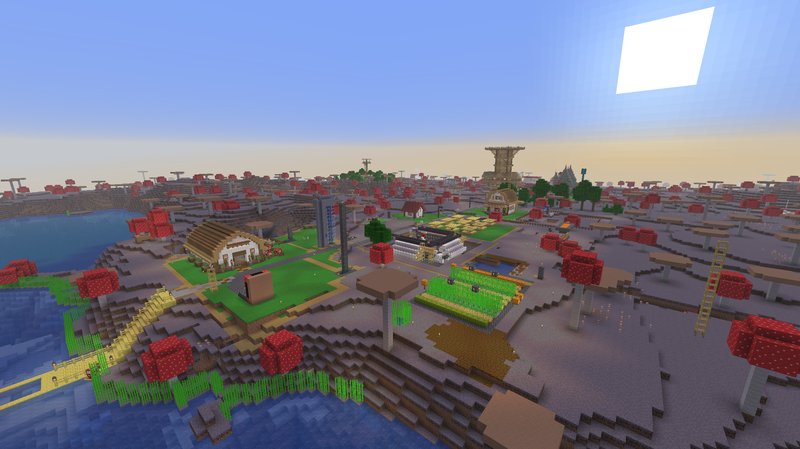
Mooshroomia
Currently active survival world running a mix of custom plugins as well as GP. Active settlement on a huge mushroom island.
> cat /worlds/mooshroomia/guide.md
The Network
Finite Frontier runs multiple servers behind a Velocity proxy. When you first connect, you land in the Hub — a lobby with portals to other servers. To reach Mooshroomia, you need access (see Getting Access below), then walk through the Mooshroomia portal in the Hub.
To return to the Hub from any server, use /hub.
If you disconnect while on Mooshroomia, you'll be reconnected there when you rejoin.
Bedrock players can connect via Geyser on port 19133 with full crossplay.
Mooshroomia at a Glance
- Gamemode: Survival
- Difficulty: Hard
- World border: 3,500 block radius (overworld and nether), 11,068 block radius (the end)
- PVP: Opt-in (off by default — see PVP section)
- No teleportation — you walk everywhere, no
/home,/spawn,/tp, or/warp - No admin shops — all commerce is player-to-player
- No handouts — you start with nothing and earn everything
Your First Spawn
When you first join (or die without a bed), you spawn at a random location in a donut-shaped zone around the spawn lake. The zone extends from 10 to 100 blocks out from the center. Each respawn is a different random location within this ring. The spawn system avoids placing you inside other players' claims, in lava, or on dangerous blocks.
Set a bed as soon as possible — it's the only way to control where you respawn.
Spawn Blocks
You can craft an expensive Spawn Block — a lodestone-based item that registers as a possible random spawn point. When placed, it gets added to the pool of spawn locations. Other unbedded players may randomly spawn near it.
Spawn Block recipe (3x3 crafting table):
Gold Block   | Iron Block | Gold Block
Iron Block   | Lodestone  | Iron Block
Redstone Blk | Nether Star| Redstone Blk
Economy
Mooshroomia runs on Diamond Dollars. There is one way to create money: mine diamonds and sell them.
Earning Money
| Action | Command | Result |
|---|---|---|
| Sell a diamond | /sell diamond |
+$10,000 per diamond |
| Sell your inventory's diamonds | /sell diamond (hold diamonds) |
$10,000 each |
That's it. Diamonds are the only item with sell value. All money in the economy comes from mined diamonds.
Diamond Exchange Blocks
You can also craft a Diamond Exchange — a placeable block that lets anyone convert between diamonds and cash by clicking it.
- Left-click: Sell 1 diamond ($10,000)
- Shift+Left-click: Sell a stack (up to 64 diamonds)
- Right-click: Buy 1 diamond ($10,000)
- Shift+Right-click: Buy up to 64 diamonds
Diamond Exchange recipe:
Ender Eye     | Writable Book | Ender Eye
Iron Block    | Chest         | Iron Block
Diamond Block | Diamond Block | Diamond Block
Breaking a Diamond Exchange with Silk Touch returns the item. Without Silk Touch, it drops nothing.
Money Commands
| Command | What it does |
|---|---|
/bal |
Check your balance |
/baltop |
See the richest players |
/pay <player> <amount> |
Send money to another player |
You start with $0. There are no loans — your balance cannot go below zero.
Land Claims
Land is protected using GriefPrevention. You buy claim blocks with resources and use them to protect rectangular areas of land.
Tools
| Tool | Use |
|---|---|
| Stick | Right-click to inspect. Shows claim boundaries and owner. |
| Golden Axe | Right-click two corners to create or resize a claim. |
Getting Claim Blocks
You start with 0 claim blocks and earn 0 per hour — you must acquire them yourself. There are two ways:
1. Mine raw iron (resource-based, recommended):
/cb buy <amount>     — Convert raw iron in your inventory to claim blocks (1:1)
/cb balance          — Check your claim block balance
One raw iron = one claim block. Simple.
2. Spend money (diamond dollars):
/buyclaimblocks <amount>    — Buy claim blocks at $100 each
/sellclaimblocks <amount>   — Sell claim blocks back at $100 each
Creating a Claim
- Get a golden axe
- Right-click one corner of the area you want to protect
- Walk to the opposite corner and right-click again
- The claim is created (minimum 2x2 blocks)
Claims extend from sky to bedrock. You can have unlimited claims.
Managing Claims
| Command | What it does |
|---|---|
/trust <player> |
Grant full build permission in your claim |
/containertrust <player> |
Grant access to chests, animals, and beds |
/accesstrust <player> |
Grant use of buttons, levers, and doors |
/untrust <player> |
Revoke all permissions |
/trustlist |
See who has permissions in the current claim |
/subdivideclaims |
Enter subdivision mode to create sub-areas within a claim |
/basicclaims |
Exit subdivision mode |
/abandonclaim |
Delete the claim you're standing in (100% block refund) |
/abandonallclaims |
Delete all your claims |
/claimslist |
View all your claims with sizes and locations |
/trapped |
Get rescued if you're stuck inside someone's claim |
Claim Expiration
- Chest claims (auto-created): expire after 7 days of inactivity
- All claims: expire after 60 days of inactivity
- Exception: players with 10,000+ total claim blocks are exempt from expiration
Claim Protection
Inside your claim:
- Other players cannot build, break, or access containers
- Creeper and other explosions are blocked
- Fire does not spread or cause damage
- Endermen cannot move blocks
- Crops cannot be trampled
- Ender pearls require access trust to land inside
- Animals are protected
- Villager trading requires permission
Naming Your Claims
Give your claims custom names that show as titles when players enter:
| Command | What it does |
|---|---|
/nameclaim <name> |
Name the claim you're standing in (supports color codes with &) |
/nameclaim clear |
Remove the claim's name |
/nameclaim |
View the current claim's name |
/claimtop |
Leaderboard — players ranked by total claim blocks |
/claimsbook |
Get a guidebook explaining claims and the market |
Named claims also appear as markers on the web map.
Claim Market
You can buy and sell land claims directly.
Selling a Claim (Fixed Price)
- Stand inside your claim
- Place a sign
- Write on the sign:
- Line 1:
[For Sale] - Line 2: price (e.g.
50000or50kor1.5M)
- Line 1:
- The sign auto-formats with your name and claim dimensions
- Other players right-click the sign to purchase
Auctioning a Claim (Sealed-Bid Vickrey)
- Stand inside your claim
- Place a sign
- Write on the sign:
- Line 1:
[Auction] - Line 2:
min:<price>(minimum bid, e.g.min:10000) - Line 3:
now:<price>(optional buy-now price, e.g.now:50000) - Line 4: duration (e.g.
2d,48h,3h30m) — defaults to 72 hours
- Line 1:
Auctions use Vickrey pricing: all bids are sealed (hidden), and the winner pays the second-highest bid, not their own. This encourages honest bidding — just bid what the claim is worth to you.
If someone bids at or above the buy-now price, the claim sells immediately.
Cancelling a Listing
Break the sign to cancel a sale or auction (bidders are refunded).
Market Commands
| Command | What it does |
|---|---|
/ffc list |
Browse all active sales and auctions |
/ffc mybids |
See auctions you've bid on |
/ffc mylistings |
See your active listings |
/ffc transactions |
View recent completed transactions |
/ffc tx <TX#> |
View details of a specific transaction |
When a claim sells, the buyer automatically receives enough bonus claim blocks to own it.
Player Shops
Player-to-player commerce uses QuickShop — chest-based shops.
Creating a Shop
- Place a chest (or barrel, trapped chest, or ender chest)
- Hold the item you want to sell
- Left-click the chest
- Enter the price in chat
- Stock the chest with items
Creating a shop costs $10. Changing prices costs $50.
Using a Shop
- Left-click a shop sign to buy/sell
- The display item on top of the chest shows what's being sold
Finding Shops
| Command | What it does |
|---|---|
/finditem TO-BUY <item> |
Search for shops selling an item |
/finditem TO-SELL <item> |
Search for shops buying an item |
Aliases: /searchshop, /shopsearch, /searchitem
Results show price, stock, location, and shop owner. You can click to teleport directly to a shop (this is the one exception to the no-teleportation rule).
Shop owners can hide their shop from search results with /finditem hideshop.
Chat
Chat uses CarbonChat and is shared across the entire network — messages sent on Mooshroomia are visible to players on Hub, WorldIsland, and all other servers (and vice versa).
Channels
| Channel | Command | Quick Prefix | Range | Description |
|---|---|---|---|---|
| Global | /global |
! |
Network-wide | Default channel, visible on all servers |
| Local | /local |
# |
99 blocks | Proximity chat — only nearby players on Mooshroomia hear you |
| Staff | /staff |
$ |
Network-wide | Staff only |
| Swedish | /swedish |
~s |
Network-wide | Swedish language channel |
| Brazilian | /brazilian |
~b |
Network-wide | Brazilian Portuguese channel |
Switch your default channel with the command (e.g. /global), or use the prefix for a single message (e.g. !hello everyone).
You can mention other players with @name. Chat is also bridged to Discord.
PVP
PVP is opt-in. By default, you are protected from other players.
| Command | What it does |
|---|---|
/pvp |
Toggle PVP on/off |
/pvp on |
Enable PVP (you can attack and be attacked) |
/pvp off |
Disable PVP (protected) |
Both players must have PVP enabled for combat to work. If either player has PVP off, the attack is blocked. This applies to melee, arrows, and tridents.
Your PVP status is shown on login.
Inside claims, players are also protected from PVP regardless of toggle status. Combat logging (disconnecting during a fight) is punished — 15-second combat timer.
Web Map
Mooshroomia has a live web map showing the world, player locations, and claim boundaries. Check the Maps page for links.
Features:
- Live player positions (Mooshroomia only)
- Claim boundaries overlay
- Named claim markers
- World border outline
- Web chat (send messages from the map)
Commands Reference
Economy
| Command | What it does |
|---|---|
/sell diamond |
Sell diamonds for $10,000 each |
/bal |
Check your balance |
/baltop |
Richest players leaderboard |
/pay <player> <amount> |
Send money to a player |
Claim Blocks
| Command | What it does |
|---|---|
/cb buy <amount> |
Convert raw iron to claim blocks (1:1) |
/cb balance |
Check your claim block count |
/buyclaimblocks <amount> |
Buy claim blocks with money ($100 each) |
/sellclaimblocks <amount> |
Sell claim blocks for money ($100 each) |
Claims
| Command | What it does |
|---|---|
/trust <player> |
Grant build permission |
/containertrust <player> |
Grant container/animal access |
/accesstrust <player> |
Grant button/lever/door access |
/untrust <player> |
Revoke permissions |
/trustlist |
List permissions in current claim |
/abandonclaim |
Delete current claim (full refund) |
/abandonallclaims |
Delete all claims |
/claimslist |
List all your claims |
/subdivideclaims |
Enter subdivision mode |
/basicclaims |
Exit subdivision mode |
/trapped |
Escape from someone else's claim |
/nameclaim <name> |
Name your claim |
/claimtop |
Claim blocks leaderboard |
/claimsbook |
Get the claims guidebook |
Claim Market
| Command | What it does |
|---|---|
/ffc list |
Browse sales and auctions |
/ffc mybids |
Your active bids |
/ffc mylistings |
Your active listings |
/ffc transactions |
Recent completed sales |
Shops
| Command | What it does |
|---|---|
/finditem TO-BUY <item> |
Find shops selling an item |
/finditem TO-SELL <item> |
Find shops buying an item |
/finditem hideshop |
Hide your shop from search |
/finditem revealshop |
Unhide your shop |
Chat
| Command | What it does |
|---|---|
/global |
Switch to global chat |
/local |
Switch to local chat (99 blocks) |
/msg <player> <message> |
Private message |
Combat
| Command | What it does |
|---|---|
/pvp |
Toggle PVP on/off |
Navigation
| Command | What it does |
|---|---|
/hub |
Return to the Hub from any server |
Information
| Command | What it does |
|---|---|
/list |
See online players (network-wide) |
/near |
See nearby players |
/seen <player> |
When a player was last online |
/depth |
Your current Y level |
/getpos |
Your coordinates |
/time |
Current world time |
/compass |
Your compass bearing |
/itemdb |
Info about the item you're holding |
/afk |
Toggle AFK status |
/mail send <player> <msg> |
Send offline mail |
/mail read |
Read your mail |
Getting Access
Mooshroomia is whitelisted. There are two ways in:
- Get invited — an existing Mooshroomia or WorldIsland veteran uses
/invite <player>to grant you access - Apply on this website
Once you have access, use /server mooshroomia from the Hub.
Other Servers
The network has several other worlds, each with their own rules and plugins. These are not covered by this guide — Mooshroomia's economy, claims, shops, and commands are specific to Mooshroomia.
| Server | Description | Access |
|---|---|---|
| Hub | Lobby with portals, always accessible | Everyone |
| WorldIsland | Original FF 1.0 world (~20k blocks), adventure mode | WorldIsland veterans |
| Sketchpad | Creative-mode donor world | Sketchpad veterans or donors |
| TheShip | FF 1.0 era server, adventure mode | TheShip or WorldIsland veterans |
| Inferno | Nether-only challenge, currently offline to players | Inferno or WorldIsland veterans |
Travel between servers using Hub portals or /hub to return to the Hub. Veterans can invite others to their servers.
Discord
The server has an active Discord community bridged to in-game chat.
- Global chat is relayed between Minecraft and Discord in both directions
Server Rules
- Don't hack
- Don't be rude
> df --borders mooshroomia
| Dimension | Border | Radius | Center |
|---|---|---|---|
| Overworld | 7,000 | 3,500 | 0, 0 |